


Ask Anything Your Financial Questions Answered
Banking and finances can be confusing. All questions are good questions, so go ahead and ask! Whether you have questions specific to ACNB Bank’s products and services, or are wondering about money or banking in general, our experts are here to answer your questions.
CLICK HERE TO SUBMIT YOUR QUESTION TODAY!
Q&A's
Q. My debit card cracked. How do I get a new card?
A. You may visit any of our community banking offices to have your debit card replaced or call our Customer Contact Center at 888-334-2262 during business hours and a specialist can assist you with ordering you a replacement debit card.
Q. Can I use the routing and account numbers from my old NWSB checks to wire funds to my ACNB checking account?
A. You may use your account number since that did not change, however, you do need to use ACNB Bank's routing number, which is 031309945.
Q. Where can I get a 1099-INT for a CD account? Are tax forms available through Online Banking?
A. You will receive a 1099-INT if we paid you over $10.00 in interest for the calendar year. If you were not paid more than $10.00 in interest, we do not report that to the IRS, therefore, no 1099-INT form is generated and mailed. We do not issue a 1099-INT if interest has just accrued on your account, however, we have not actually paid it out to you yet. If you feel that you should have received a 1099-INT for the tax year 2023, and you did not, please call our Customer Contact Center at 888-334-2262 Monday-Friday 8:00 a.m. until 6:00p.m.; Saturday 8:00a.m. until 1:00p.m. and a specialist will be happy to research this for you.
Currently, tax forms are not provided in online banking. We are working on having these available if you consent to electronic delivery of documents in the future.
Q. How can I find my account and routing number?
A. For security reasons, your account number is never posted on your online banking account. You can locate it by viewing your account opening documents or if you have checks on your account, you can locate the account number at the bottom of your checks. It is the middle number. If you do not have your account opening documents or paper checks, you may call our Customer Contact Center at 1-888-334-2262 Monday-Friday 8:00 a.m.-6:00 p.m.; Saturday 8:00 a.m.-1:00 p.m. and a Specialist can provide your account number.
The bank's routing number is 031309945, which can also be found at the bottom of our website.
Q. Does ACNB Bank offer currency exchange for Canadian currency and, if so, how does the process work, and how long does it take?
A. ACNB Bank does offer foreign currency exchange for our customers. There is no minimum amount requirement; however, there is a $25.00 per-transaction fee. The exchange can take place at any of the community banking offices. This transaction can take up to 10 business days to process. Once the transaction has been completed, a bank representative will reach out and let you know the currency has been credited to your account.
Q. How do I make a single bill pay?
A. When making a bill payment transaction, the payment is automatically set up as single/one-time payment. If you would prefer to set up a recurring payment, this would need to be completed through the Advanced Bill Pay tab, which can be found at the top of the Bill Pay Screen. You will notice there is a small tab next to your payment that says ‘Make This Recurring’.
Q. How do I set up a payee for recurring payment?
A. Log into your online banking account. In the meu, click the Transactions tab, then the Bill Payment tab. Once in bill pay, click the Advanced tab>Visit Bill Pay Site. If your payee is already set up there, click on the word view beside the payee, and then the Pay recurring button to set up recurring payments. If the payee is not already set up, you would need to add them first.
Q. Do I need to be a full-time farmer to qualify for an Agribusiness Loan? What additional programs are there to help support an Agribusiness Loan?
A. Farming is hard work and a complex industry. Because of that you deserve a financial partner who understands the local community and the demands of the agriculture industry. Andrea and Gabe, our Agribusiness Lending experts, answer a couple of the questions they are most often asked...
Q. How do I add my teenage sons debit card to the app? I am the co-signer and I want to transfer funds from my account into his so he has money on his debit card.
A. Unfortunately, funds cannot be transferred between debit cards. However, you can transfer funds between accounts and he would be able to use his card against the funds you transfer over to his account. Log in to your online banking account, click the Transactions tab on the left side of the screen, then Funds Transfer. You would pick the From Account and To Account from the drop down boxes presented. Enter the amount. If this is just a one-time transfer, you may leave the Frequency at the default of "One time transfer" and leave the Transfer date to the current date. Click the Transfer Funds button. The funds will be made available immediately in his account.
Q. How can I transfer funds from my credit card to my checking account using a cash advance?
A. You may visit any of our community banking offices and make a cash advance on your Mastercard credit card and have the funds deposited into your ACNB Bank checking account. Please bring your credit card and a valid ID. You cannot do a cash advance electronically or over the telephone.
Q. I will be traveling to Iceland and wanted to know if my ATM card will work? Also, what is the charge for using my card?
A. For your upcoming travel plans to Iceland you will need to call our Customer Contact Center at 888-334-2262 Monday-Friday 8 a.m. - 6 p.m.; Saturday 8 a.m.- 1 p.m. prior to leaving to have your debit card opened up for Iceland. There would be a foreign ATM charge for using an ATM not owned by ACNB Bank. That fee is $2.00. If the owner of the ATM charges you a fee for not being one of their customers, they will disclose that fee and have you accept the fee prior to allowing the withdrawal. If you use your card for purchases, you would be assessed a currency conversion fee by MasterCard, which is currently 1% of the purchase price.
Q. How do I better protect my business accounts against fraud? How can I make less trips to the bank to deposit business checks? How can I write less checks?
A. Whether you're working remotely or looking to streamline your business' financial processes, our Treasury Management team can help. Amber, Linda and Patrick, our Treasury Management experts, answer a couple of the questions they are most often asked...
Q. I have a notice of a maximum withdrawal limit reached. How do I bypass this?
A. If you have exceeded your point of sale purchase limit using your debit card, you may call our Customer Contact Center at 888-334-2262 Monday-Friday 8 a.m. - 6 p.m.; Saturday 8 a.m.- 1 p.m. and a Specialist can submit a request to have your limit temporarily raised.
Q. I don’t remember password. How do I reset?
A. To reset your password once you are logged into your online banking on your mobile device, click the Menu setting at the bottom right of your screen, then the Settings tab, then Security Preferences. Click the Change Password button. You will be able to update your password here. If you cannot get logged into your online banking on a desktop computer or by using face recognition on your phone, log into your online banking by using a Browser to pull up ACNB.com and click the forgot password feature there.
Q. Is there a way to change the recipient's name in Bill Pay without entering a new payee? For example: Potomac Edison to Allegany Power.
A. To edit a payee...
- Login into Online Banking
- In the Bill Pay area, click on the Advanced button, then Visit Bill Pay site.
- Click on the View button to the right of the payee's name.
- Click Edit Payee. You may then change the name and click Submit. This will update the payee's name in your payee listing.
Q. How do I view and send a copy of my Savings account statement from my mobile phone?
A. To view and send a copy of your savings account statement from your mobile phone...
- Once you are logged into your mobile banking, click the Menu button at the bottom right of your screen.
- From the Services menu choose eDocuments. The statement screen will pop up. Click on the PDF version on the statement you want to view/print/download.
- From this screen you should have a box with an arrow in the middle bottom of your screen...this is a phone setting. You can then print, save to a folder, email, text, etc. with the option settings on your phone. Please remember that if you want to print, you will need to have a wireless printed set up within the settings on your phone.
We also have helpful Online Banking videos and guides on our website that may be helpful.
Q. What is your current 30 year fixed mortgage rate?
A. Our 30 year fixed mortgage rate is updated Monday – Friday (excluding holidays) on the homepage of our website www.acnb.com. It is in the middle of the page with a blue background. Click on this to view other mortgage rates, more information, and applicable date of rates. You'll need to enter your zip code, click the ‘set location’ button. Scroll down a bit and then click on the ‘mortgage’ icon/circle.
For more information any of our mortgage team members would be happy to assist. Their information can be found here.
Q. Why am I charged a $2.00 monthly fee for a paper copy of my statement?
A. In January 2018 the Bank began charging a $2.00 fee for paper statements for all checking accounts. This was due to the increased price to produce these statements and mail them each month to customers. You can avoid this paper statement fee by either enrolling in Online Banking and opting to have your statements delivered to you electronically, or if you are not comfortable in having online banking, you may enroll for electronic statements (eDocuments).
To enroll for electronic statement:
- Visit our website at www.acnb.com.
- Click the LOGIN blue button at the top right of the page.
- You will see the ONLINE BANKING login with a white background.
- To the right of that with the grey background, click eDocuments.
- If you are a first time user, click the link that says "click here" to enroll.
- Enter your account number, the last for digits of your social security number and your last name.
- Create a User ID and Password.
- Once you are registered you will receive an email that your statement is ready.
You can login on our website under eDocuments with the User ID and Password that you created to be able to view your statement and print it, if needed.
This will allow you to view your statement without any of your account information displaying, it is only your statement that can be viewed.
Q. How long do I have to wait to refinance after a chapter 13?
A. Depending on the situation, 2 to 4 years. More details below.
Per Fannie Mae Guidelines:
A distinction is made between Chapter 13 bankruptcies that were discharged and those that were dismissed. The waiting period required for Chapter 13 bankruptcy actions is measured as follows:
- two years from the discharge date, or
- four years from the dismissal date.
The shorter waiting period based on the discharge date recognizes that borrowers have already met a portion of the waiting period within the time needed for the successful completion of a Chapter 13 plan and subsequent discharge. A borrower who was unable to complete the Chapter 13 plan and received a dismissal will be held to a four-year waiting period.
Exceptions for Extenuating Circumstances
A two-year waiting period is permitted after a Chapter 13 dismissal, if extenuating circumstances can be documented. There are no exceptions permitted to the two-year waiting period after a Chapter 13 discharge.
Per Freddie Mac Guidelines:
24 months from the discharge or dismissal date
Whenever a Borrower has had a bankruptcy within the last seven years, the Mortgage file must also contain:
- Copies of the bankruptcy petition, schedule of debts and discharge or dismissal
- Evidence to indicate that all debts not satisfied by the bankruptcy have been paid or are being paid
- Any other evidence necessary to support the Seller's determination that the Borrower has reestablished and maintained an acceptable credit reputation
For more information any of our mortgage team members would be happy to assist. Their information can be found here.
Q. How do I log in to the Advantage Rewards app that I just downloaded?
A. The Bank will enroll you in the Bazing rewards program when you open your Advantage Rewards or Advantage Rewards Plus checking account or upgrade your account to an Advantage Rewards or Advantage Rewards Plus checking account.
Once you are enrolled, you should receive an email notification on how to create your account. You will use the email address that the Bank has on file to Bazing and the password that you create to log in to Bazing to start using the benefits of this program.
If you did not receive your email or if you do not believe that you have been enrolled in the Bazing program, please call our Customer Contact Center at 1-888-334-2262 M-F 8-6; Sat 8-1 and a Specialist will be able to enroll you and talk to you about some of the benefits of this app and answer additional questions.
Q. How do I enroll in paperless statements?
A. If you currently have online banking, please log into your online banking. Under the Services tab on the left side of your screen, choose eDocuments. Choose the Preference tab at the top of the page. Beside your account, click Electronic from the drop down box and click Save Preferences at the bottom of the page. You will be notified each month when your statement is ready and you can log into your Online Banking to view your statement.
Q. How many branches do you have for customer banking and in what states?
A. We have a 26 community banking offices located in Pennsylvania and Maryland. If you would like more information on our locations, click here. This will take you to our branch locator map. Please note that you’ll want to click on the map in the general area you’re interested in.
Q. Is there a fee to send money through Zelle®?
A. There are no fees to send or receive funds via Zelle®.
Q. Do you need assistance with getting a payoff figure for your loan?
A. Katie, our Customer Contact Specialist, can let you know what to do next...
Q. Where is the icon to print a bank statement?
A. Here are the steps you want to take to print your ACNB Bank statements.
Personal Computer or Laptop:
- When you are viewing your electronic statements, select the statement you would like to print and click on the PDF version of it. This will be the first option to the right of the date in red.
- Once you have an image of your statement on your screen, you can select the Printer icon on your computer which is typically in the tip right corner of your screen.
- If you scroll over the icon it should say something like "print" or "print this file". You can also select your Menu button, which should be at the top left of your screen and you should see Print about half way down the menu option.
Mobile Device:
- To print your statement from a mobile device, you will need to be connected to a wireless printer.
- Go to your statements, select the statement you would like to print and click on your menu options, which looks like a box with an upwards arrow through it.
- You can select Print from there.
Q. I want to start a small business. What should I do first?
A. If you've already decided on the type of business you want to start, here's a list of essential steps to help you get off the ground:
1. Create a detailed business plan. This will not only showcase your business to others but allow you to organize your overall thoughts and create a plan to get the wheels moving. A few things that you should include are…
- Executive summary and company description complete with organization and management
- Market analysis to support your business plan
- Possible funding needs
- Marketing
- Financial projections complete with balance sheet and income statement.
2. Decide on a business structure – Sole prop, Partnership, LLC, Corporation
3. Look into a good attorney, accountant and banker that can assist throughout the process.
4. File a fictitious name, get a federal tax ID, etc. If needed, apply for licenses and permits.
5. Open bank accounts to separate business from personal and decide on good accounting software.
Additionally, if you're looking for expert guidance on managing your cash flow, payments, or financial operations, our Treasury Management team can offer tailored solutions to help your business run smoothly. Feel free to reach out to the team for more information.
Q. Has your debit card been denied, or have you received a call asking you to verify recent debit card transactions?
A. Katie, our Customer Contact Specialist, lets you know what to do next...
Q. How do I change from paper statements to electronic statements?
A. Follow these steps: 1. Log into your online banking. 2. Click the Services tab on the left side menu. 3. Click eDocuments. 4. Click the Preferences tab at the top of the page. 5. Under Statements, select Electronic from the drop down box. 6. Click Update Preference at the bottom center of the page.
Q. Are you looking to start or expand your business?
A. Our Commercial Loan Officer experts are here to help! Tony, Kristen and Tonya answer a couple of the questions they are most often asked.
Q: How do I add another account to my online access?
A: If you need to add another account to your personal online banking, you may call our Customer Contact Center at 1.888.334.2262 during business hours and a specialist will be able to assist you with that request. They will be able to file your request with our Online Banking department and you should be able to view that account within 24 business hours of your request. The account that you want to add will need to be a personal account that you are an owner of. If it is a business account that you are a signer on, such as a Sole Proprietorship, Trust Account, Corporate Account, those will require a completely different Username and Password than your personal accounts. Our Contact Center team can also assist you with getting that set up. You may also submit your request via your current online banking by logging into your online banking and clicking the Messages tab on the left side of your screen in the menu. Please note that these messages are responded to by our Contact Center during our regular business hours, which are Monday-Friday 8:00 a.m. - 6:00 p.m.; Saturday 8 a.m. - 1 p.m. Our Contact Center telephone number is 1.888.334.2262.
Q. Are you trying to send money via Zelle, but received a message that you needed to contact the Bank?
A. Jasmine, our Customer Contact Specialist, explains what you should do next.
Q. How do I close a savings account?
A. To close a savings account, visit any of our Community Banking Offices or mail us a written request that includes a note stating, 'I would like to close my savings account,' and the following...
1. The last four digits of your savings account number
2. Instructions about how you would like your funds disbursed. If you have other accounts with ACNB Bank, you may opt to have the funds directly transferred into that account. Include the last 4 digits of that account number. If you do not, we will mail you a cashier's check to the address that we have on file for you.
3. Your telephone number should we need to reach you for verification purposes.
4. Your signature
5. Date of request The address to send the letter to is ACNB Bank, P.O. Box 3129, Gettysburg, PA 17325
Q. Are you having difficulties getting logged into your online banking?
A. Jasmine, our Contact Center Specialist explains what you should do.
Q. How do I deposit a check with my phone?
A. Click on the video below to learn how to make a mobile deposit with your phone or mobile device.
Q. Where are the bank’s branches?
A. The community banking office locations can be found by clicking on the word 'Locations' at the top right of ACNB Bank's website.
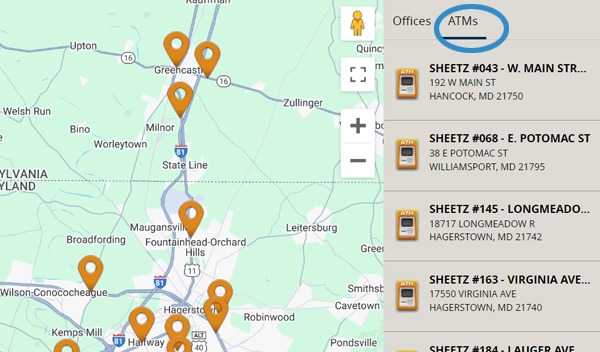
Q. Can I use an ATM for free?
A. To avoid ATM fees, visit an ATM at a variety of ACNB Bank office locations and at over 500 surcharge-free ATM locations at Sheetz®.
Q. What is ACNB Bank's routing number?
A. ACNB Bank's routing number is 031309945. This information can also be found at the bottom of our website.
Report Lost or Stolen Card
- Debit Card or Line of Credit Card:
1.800.472.3272 - Toll Free - Personal and Business Credit Cards:
1.800.367.7576 - Toll Free